Create stamp
There are two type of stamps:
- Static stamps – it can be any PNG image. It is not possible to use “user” and “date” macro there.
- Dynamic stamps – it is vector graphic PDF. This can contain macros.
A PDF editing program is required to create a dynamic stamp (e.g. Perfect PDF 8 or Adobe Acrobat). In this program we can draw stamp layout. Macros should be placed in the texbox.
At the moment there are only two macros: &user, &date.
&date macro can contain a “date formatting” string (e.g. &date[m/d/Y])
Here is the list of possible options that can be used in “date formatting” string:
- d – current day
- m – current month
- Y – current year (4 digits)
- y – current year (2 digits)
- H – current hour (24 hour format)
- I – current hour (12 hour format)
- M – current minute
- S – current second
- p – (AM/PM)
Edit stamp
To change the font size of a text box in Adobe Acrobat, you have to edit the text box's properties. Adobe Acrobat is not ideally a PDF editor – you have to use the Pro version to do so. Follow the simple steps shown below, and you will be able to change the font size in the PDF file that you want. The steps below will show you how to change the font size in a PDF stamp.
Step 1. Add a Text Box
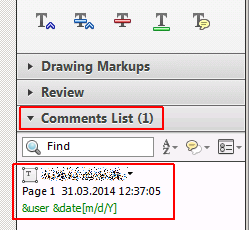
Open Adobe Acrobat, go to the 'Comment Panel' and then under 'Markup' click on 'Comments List'
Step 2. Start editing
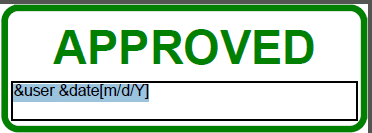
Double click the macro text in the stamp - the text becomes editable
Step 3. View Text Properties
Open the Properties Bar - hit Ctrl+E on the keyboard - Properties Bar appears and you will be able to change font size here.
Step 4. Save changes
Applied to versions: All Versions
Was this article helpful?
That’s Great!
Thank you for your feedback
Sorry! We couldn't be helpful
Thank you for your feedback
Feedback sent
We appreciate your effort and will try to fix the article