Overview
SafeMode restricts script execution in Therefore to prevent unauthorized access to the file system or external databases. In some cases, scripts require SafeMode to be disabled. This article explains where and how SafeMode can be disabled, and what limitations apply.
Therefore Online (TFO)
SafeMode cannot be disabled in Therefore Online
- Any scripts requiring SafeMode to be turned off will not work in Therefore Online.
Workflow / Server-Side Scripting
SafeMode can be disabled in the Solution Designer:
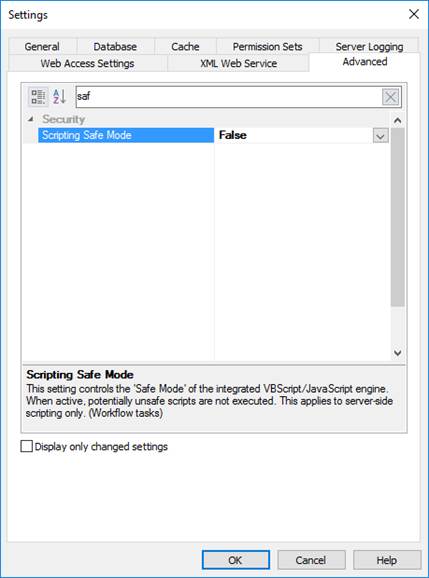
This applies only to:
- Workflow Tasks
- eForms (from version 30 onwards)
For version 29 and earlier, disabling SafeMode for EForms required modifying registry keys where TheXMLService is running.
SafeMode cannot be disabled for Content Connector or other server services.
Client-Side Scripting
SafeMode can also be disabled on the client side via registry keys.
This affects the following applications:
- Document Loader
- Content Connector
- Capture Client
- Solution Designer (when testing indexing profiles)
- Navigator (Template Profiles)
- Case Manager (Template Profiles)
- Office Integration
- TheXMLServer (for eForms in version 29 and earlier)
Registry Settings
32-bit Applications
HKEY_LOCAL_MACHINE\SOFTWARE\WOW6432Node\Therefore\Client\(DWORD)DeactivateSafeMode = 1
64-bit Applications
HKEY_LOCAL_MACHINE\SOFTWARE\Therefore\Client\(DWORD)DeactivateSafeMode = 1
Common Errors When SafeMode is Enabled
JavaScript
Error on line 1 column 1
Description: Automation server can't create object
Source: JavaScript runtime error
ErrorCode: -2146827859
VBScript
Error on line 1 column 1
Description: ActiveX component can't create object: 'TheAPI.TheServer'
Source: Microsoft VBScript runtime error
ErrorCode: -2146827859
Summary
- TFO: SafeMode cannot be disabled
- Workflow / Server scripts: Can disable via Solution Designer (Tasks, eForms ≥ version 30)
- Client scripts: Can disable via registry keys
- Errors usually indicate SafeMode restrictions
Applied to Versions: All Versions
Was this article helpful?
That’s Great!
Thank you for your feedback
Sorry! We couldn't be helpful
Thank you for your feedback
Feedback sent
We appreciate your effort and will try to fix the article