Method 1 – Via the device
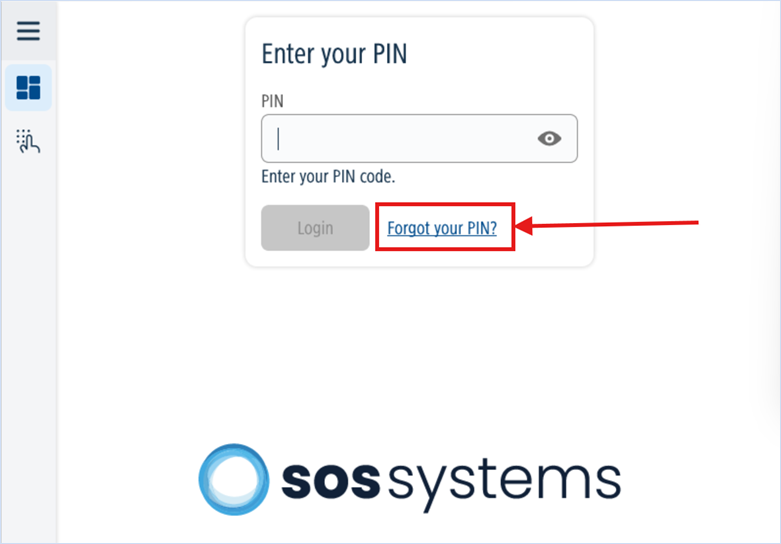
On the screen of your photocopier, select the ‘Forgot your PIN?’ option.
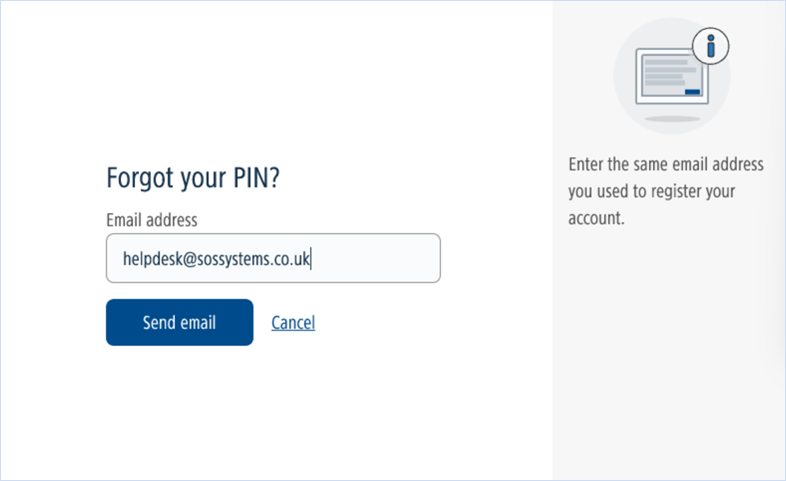
Type in your email address and the PIN code will be emailed to you.
Method 2 – Via the uniflow Online Dashboard
Enter the URL for your uniFLOW Online tenant into a web browser.
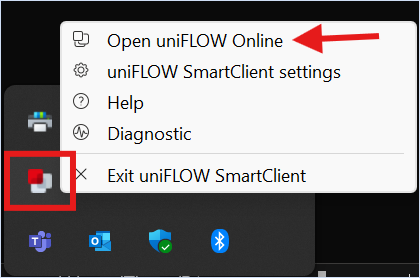
How to find my uniFLOW Online URL? – the URL can be found in your uniFLOW Online SmartClient. In your icon tray (Windows) or at the top of your screen (Mac) right click on the uniFLOW SmartClient icon and click Open uniFLOW Online:
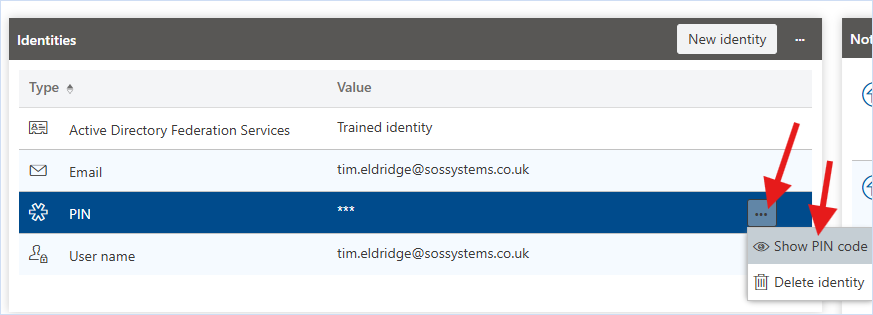
This will take you to your uniFLOW Online tenant, here you can sign in and view your pin code on your dashboard under the Identities widget:
For users working with an older version of the client, you can find the URL by right clicking on the smart client icon and clicking ‘About’
If you are still unable to retrieve your pin code, please contact us on helpdesk@sossystems.co.uk.
Was this article helpful?
That’s Great!
Thank you for your feedback
Sorry! We couldn't be helpful
Thank you for your feedback
Feedback sent
We appreciate your effort and will try to fix the article